ARTICLE . UPDATED JUNE 2026
What Happens to Old Versions After a Relicense
BY FREDRIK FILIPSSON · REVIEWED BY MORTEN ANDERSEN
What happens to old versions after a relicense is the first question most teams should ask, and the answer is calmer than the headlines suggest. A relicensing event almost always applies to releases published after the change. The code you already run usually keeps the terms it shipped with. The exposure tends to arrive with the next upgrade, not with the announcement. This article shows where the line falls and how to stay on the right side of it.
When a project announces a license change, the instinct is to assume the worst about everything already in production. That instinct usually overstates the immediate risk and understates the medium term one. The releases you already deployed are typically governed by the license they were published under, while the new terms attach to future releases. Getting this distinction right is the difference between a measured plan and a panicked migration. The general mechanics of a license change are set out on the relicensing pillar, and this article focuses on the specific question of prior versions.
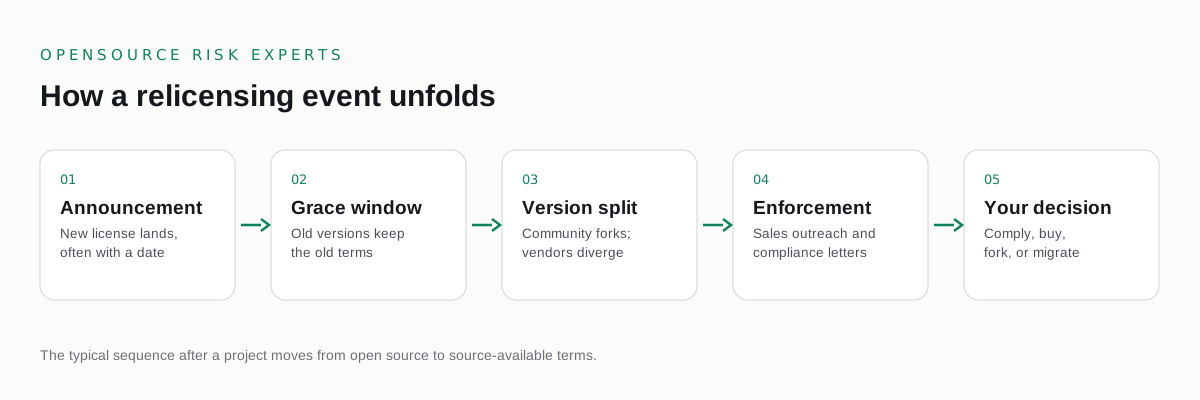
What happens to old versions after a relicense in practice
A license grant attaches to a release. When a project publishes version under a given license and you obtain that version, the grant on that version is generally settled. A later decision to publish new releases under different terms does not reach back and rewrite the license on a version already out in the world. In the recent wave this pattern held across the major changes. HashiCorp moved Terraform, Vault, Consul, Nomad, and Packer to the Business Source License 1.1 as of August 2023, and the releases that predate that change remained under their prior license. Redis moved to a Redis Source Available License and the Server Side Public License as of March 2024, and Elasticsearch and Kibana moved to the Server Side Public License and the Elastic License as of 2021, each affecting releases from the change forward. Source available is not open source, and these licenses are not approved by the Open Source Initiative, but neither point changes the basic timing.
Why the exposure arrives with the next upgrade
If the version you run keeps its original terms, the real risk is the moment you move off it. A security fix, a new feature, or a routine upgrade may only be available under the new license, and pulling that release in brings the new terms with it. This is why a relicense is rarely an emergency on the day it is announced and often becomes one months later, when a team upgrades without realizing the license changed underneath them. The way to see this coming is to know exactly which versions you run and which releases would cross the line. The framing of how the change creates exposure is covered in relicensing and your compliance obligations, and the timing detail is in notice and effective dates in a relicense.
The limits of pinning to a prior version
Pinning to a release published before the change is a sound short term tactic. It keeps you under the original license while you plan, and it buys time without committing to a migration. It is not a permanent answer. A frozen version stops receiving security fixes and new capabilities, and that gap widens with every passing month. Eventually a vulnerability or a feature need forces an upgrade, and the only available release carries the new terms. Treat pinning as a bridge to a decision rather than the decision itself, and use the time it buys to map your options rather than to defer them.
How forks keep prior code alive under open terms
A community fork takes the codebase as it stood before the change and continues it under a recognized open source license. OpenTofu forked Terraform and Valkey forked Redis, and OpenSearch continues the Elasticsearch lineage. A fork solves the central weakness of pinning, because it keeps the maintenance stream flowing under open terms rather than freezing you on a release that will not be patched. Whether a fork fits depends on its momentum, its compatibility with your deployment, and the cost of the switch, all of which are weighed in the OpenTofu and Valkey fork story. A fork is often the cleanest way to stay current without taking on the new license.
How to confirm which versions you actually run
Everything above depends on knowing precisely which versions are in your estate. Build a software bill of materials that pins each component to its exact version and records the license that version shipped under. That inventory tells you which parts of your estate sit before the change and which have already crossed into the new terms, turning a vague worry into a short, specific list. From there you can decide where pinning is safe for now, where a fork is the right move, and where a negotiated license is the honest answer. A risk assessment produces this picture and routes interpretation questions to your counsel. The procurement angle, where a relicense intersects renewals and approvals, is covered in relicensing and procurement approval processes.
We are independent and buyer side. We take no vendor fees and resell no software, so our read of which versions you can safely keep reflects your exposure and nothing else. This is commercial and licensing risk advisory, not legal advice. For interpretation of how a specific relicense treats prior versions, engage your own counsel.
COMMON QUESTIONS
Questions buyers ask.
What happens to old versions after a relicense?
A relicensing event almost always applies to the versions released after the change. The releases published before the change generally remain available under their original license, so the code you already run usually keeps the terms it shipped with. The new license attaches to new releases, which is why the exposure tends to arrive with the next upgrade rather than with the announcement.
Can a vendor retroactively change the license on a version I already have?
A license already granted on a released version is generally not revoked by a later change to new releases. The prior version typically continues under the license it was published with. The practical limits are not legal but operational: prior versions stop receiving updates and security fixes, and continuing to rely on them carries its own risk that has nothing to do with the license.
Is it safe to pin to a pre change version?
Pinning to a version released before the change is a common short term tactic that keeps you under the original license while you plan. It is not a permanent answer, because that version no longer receives security fixes or new features, and any future patch may only be available under the new terms. Treat pinning as a bridge to a decision, not the decision itself.
How do forks like OpenTofu and Valkey fit in?
A community fork continues the prior codebase under a recognized open source license. OpenTofu forked Terraform and Valkey forked Redis. A fork lets you keep receiving updates under open terms rather than freezing on a pre change version, which is why forks are central to any plan that needs ongoing maintenance without taking the new license.
How do we confirm which version we actually run?
Build a software bill of materials that pins each component to its exact version and records the license that version shipped under. This tells you precisely which parts of your estate sit before the change and which have crossed into the new terms, which is the difference between a calm position and a guess. A risk assessment produces this picture.
Is this legal advice?
No. This is commercial and licensing risk advisory, not legal advice. For interpretation of how a specific relicense treats prior versions, engage your own counsel.
CONTAINMENT
Know which versions you can safely keep.
A confidential relicensing exposure review. Independent, buyer side, paid only by you.
Not ready to talk? Read the free open source license risk guides first.
One email when a major project relicenses. No marketing, unsubscribe any time.
MORE IN THIS CLUSTER