ARTICLE / RELICENSING
Notice and effective dates in a relicense.
BY FREDRIK FILIPSSON · REVIEWED BY MORTEN ANDERSEN
A relicense is not a single moment. The notice and effective dates in a relicense decide which versions you can still use under the old terms and which now carry the new ones. This guide explains how the cutoff works, why your installed version matters more than the headline, and how to track it across your estate.
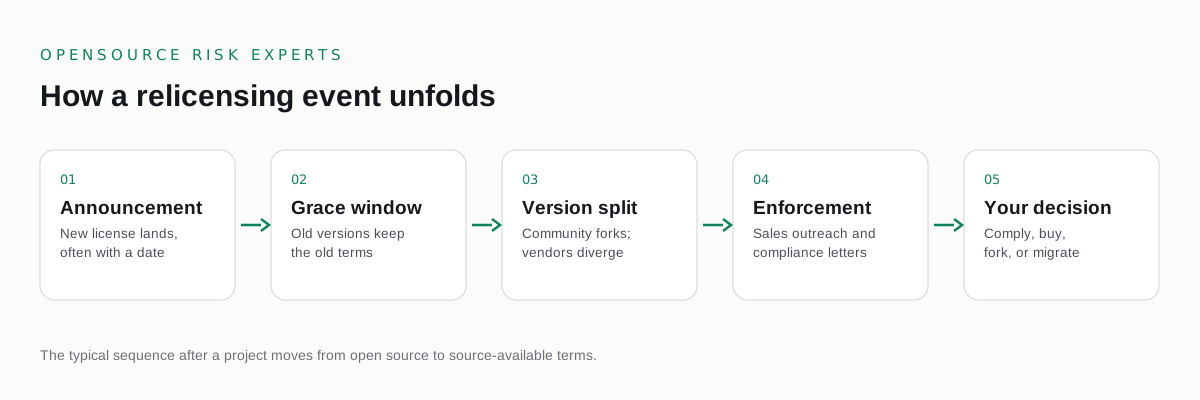
When a project relicenses, the news arrives as a single announcement. The reality underneath is a set of dates and version boundaries that determine your actual position. Two teams running the same software can have completely different exposure depending on which release they deployed and when. Getting the dates right is the difference between a calm confirmation that you are covered and an unwelcome surprise during an audit.
What are notice and effective dates in a relicense?
The notice date is the day a project publicly announces that its license will change. The effective date is the release boundary from which the new license actually applies. Versions published before the effective date keep their original license. Versions published on or after it carry the new terms. The gap between notice and effective gives you a planning window, though in practice many relicensing events make the change effective immediately with the next release, so the window can be short or nonexistent.
The relicensing wave gives concrete anchors. As of August 2023, HashiCorp moved Terraform, Vault, Consul, Nomad, and Packer to the Business Source License 1.1, applying to releases from that point forward. As of March 2024, Redis moved to the Redis Source Available License and the Server Side Public License. Elasticsearch and Kibana moved to the Server Side Public License and the Elastic License in 2021. In each case the older releases under the prior license remained under that license, while everything after the boundary carried the new terms.
Why your installed version matters more than the announcement
The license that governs your software is the license attached to the release you run, not the date you read the news. This is the single most misunderstood point. A team that adopted a project under an open license five years ago may assume they are still covered by it. If they have since upgraded to a release past the effective date, the new license now applies to the version they run. The relationship that matters is between the effective date and your installed version, and that relationship can change silently every time someone applies an update.
This is why the first fact you need is not when the relicense happened but which version sits in production. Without that, you cannot say which license governs you. With it, the question often answers itself.
Can you stay on the old version under the old license?
In general, a release published under an open license stays under that license for that release. You can usually continue running the specific older version under its original terms. This is a legitimate strategy and many teams choose it in the short term. The cost is that you freeze on older code. You stop receiving the security fixes and features that ship in newer releases, which now carry the new license. Over time that gap becomes its own risk, particularly for security sensitive components. Staying put buys time. It does not resolve the underlying decision, and whether the original license genuinely continues to apply to your use is a question for your own counsel.
The upgrade that quietly changes your license
The most common way teams cross the boundary without noticing is a routine upgrade. A platform team applies a patch release for a security fix. A base container image updates. A dependency pin moves forward. None of these feel like a licensing decision, yet any of them can move a system from a pre boundary release under the old license to a post boundary release under the new one. The licensing consequence is invisible at the moment of the change and only surfaces later. This is why the effective date needs to be a control in your upgrade process, not a fact you check once and forget.
How to track effective dates across your estate
Make the dates a managed fact. Maintain a short register of the relicensed projects you depend on, each with its effective date and the license on either side of the boundary. Then connect that register to a current inventory that records the version each system runs. With both in place, finding your exposure becomes a lookup: which systems run a version on or past the effective date. A current software bill of materials turns this from an investigation into a query you can run whenever a team upgrades. The discipline that keeps the inventory fresh is the same discipline that keeps the date register useful.
From dates to a defensible position
Tracking notice and effective dates is part of our relicensing exposure review. For the full picture, read our pillar on open source relicensing. To understand the license that drives most of these dates, read the Business Source License explained. To see how a corporate event can trigger a change, read relicensing triggered by acquisition, and for the obligations that follow, read relicensing and your compliance obligations.
COMMON QUESTIONS
Questions buyers ask.
What are notice and effective dates in a relicense?
The notice date is when a project announces a license change. The effective date is the release from which the new license applies. Versions published before the effective date keep their original license, while versions published on or after it carry the new terms. The gap between the two dates is your window to plan.
Can I keep using the old version under the old license?
Generally a version released under an open license stays under that license for that release. You can usually continue to use the specific older version under its original terms. The cost is that you stay on older code and miss the security fixes and features in releases that carry the new license. Your own counsel should confirm the position for your specific component.
Why does my installed version matter more than the announcement date?
The license that governs your software is the license attached to the release you actually run, not the date you heard about the change. If you upgraded past the effective date, the new license applies even if you adopted the project years earlier. Knowing your installed version is therefore the first fact you need.
How do I track effective dates across my estate?
Record the effective date for each relicensed project and the version each system runs, then flag any system on or past the effective date. A current inventory through software composition analysis makes this a lookup rather than an investigation, and keeps it current as teams upgrade.
Is this legal advice?
No. This is commercial and licensing risk advisory, not legal advice. For interpretation of which license applies to a specific version you run, we recommend your own counsel.
RELICENSING EXPOSURE
Know which side of the date you sit on.
Our relicensing exposure review maps every version against its effective date. Independent, buyer side, paid only by you.
Not ready to talk? Read the free open source license risk guides first.
One email when a major project relicenses. No marketing, unsubscribe any time.
MORE IN THIS CLUSTER