HASHICORP AND TERRAFORM
Assessing Terraform exposure across teams.
Assessing Terraform exposure across teams is harder than it sounds, because Terraform spreads bottom up, team by team, with no central record. This article sets out how to build one honest inventory of who runs which version for what purpose, then turn it into a sized decision.
Terraform did not enter most enterprises through a procurement decision. It arrived team by team, picked up by whichever group needed to provision infrastructure, copied into pipelines, and pinned at whatever version was current that quarter. That bottom up adoption is exactly why assessing Terraform exposure across teams is difficult: there is no single record of who runs what. The Business Source License change makes that scatter a liability, because the license that applies depends on the version each team happens to run.
Why the version matters so much
As of August 2023 HashiCorp moved Terraform, Vault, Consul, Nomad and Packer from an open source license to the Business Source License 1.1. Releases from that point carry the new terms. Earlier releases remain under the prior open source license. This makes version the single most important fact in your inventory. A team still on a pre change release sits under the old license for that deployment, while a team that upgraded inherited the Business Source License, often without noticing. Two teams running what they both call Terraform can be in entirely different license positions.
The Business Source License restricts competitive production use and converts to an open license after a delay, commonly four years. It is source available, not open source, and it is not approved by the Open Source Initiative. The community fork OpenTofu continues the last open release. For the broader context of the change, see the HashiCorp and Terraform pillar. The point for assessment is that you cannot reason about exposure until you know, per team, which side of the August 2023 line each deployment falls.
Building the inventory
A useful inventory answers four questions for every team that touches the affected tools. Which version of Terraform, Vault, Consul, Nomad, or Packer is in use. How is it deployed, internally or in something that reaches clients. Does it sit inside a product or a client facing service, or purely in internal operations. Which pipelines, modules, and container images pull it in. The last question matters because Terraform often arrives indirectly, baked into a base image or invoked by a build step rather than installed deliberately.
Look where teams hide their tooling
The hard part of the inventory is completeness. Teams keep Terraform in places a central scan misses: personal pipelines, contractor environments, dormant projects, and container images built months ago. A version pinned in a Dockerfile is as real as one installed on a server, and it travels wherever the image goes. The discipline that finds container based usage elsewhere applies here too, as set out in open source license risk in containers and images. Assume the first pass is incomplete and go back for the gaps.
Separating internal use from competitive use
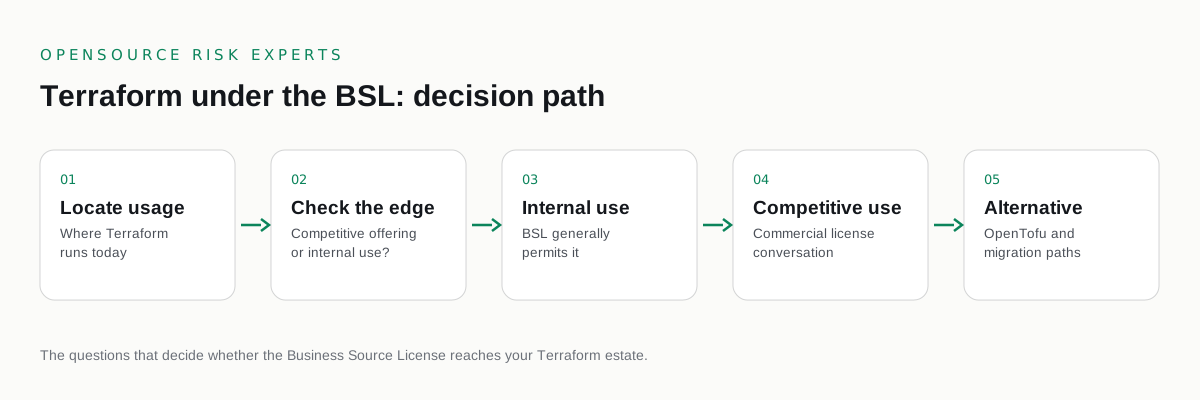
Once you can see every deployment, sort it. The Business Source License targets competitive production use, so the most important cut is between use that is clearly internal and use that touches a product or a client facing service. A team using Terraform to provision the company's own infrastructure looks different from a team building a self service infrastructure product on top of it. Most of your estate will fall cleanly on the internal side. The value of the assessment is isolating the small share that does not, so attention goes where the exposure actually is.
This sorting is risk advisory work, not legal interpretation. Building the map of who uses what and how is something an enterprise can do for itself or with an independent advisor. Deciding whether a given competitive looking deployment actually breaches the license is a legal question that belongs with your own counsel, informed by the map. Keeping those two activities separate keeps the assessment honest and the legal question precise.
Sizing the exposure
With the deployments sorted, the exposure becomes a comparison rather than a worry. For the deployments that matter, estimate two costs. The first is the cost to migrate to OpenTofu, including testing, module compatibility, and retraining. The second is the cost of a commercial license sized to your actual usage. Set both against the risk of staying on the Business Source License where it does not fit. That comparison turns a diffuse anxiety into a decision a leadership team can make and a board can review.
Use the assessment as leverage
A complete, current inventory is also a negotiating asset. If a commercial license is the right path for part of the estate, you negotiate from a precise baseline of usage rather than a vendor's list price, and the credible option of migrating to OpenTofu strengthens your position. The same map that contains the risk also lowers the price of resolving it. For the common follow on questions, see the HashiCorp BSL frequently misunderstood terms, and for service providers specifically, HashiCorp BSL and managed service providers.
Keeping the map alive
A Terraform exposure assessment is not a one time exercise. Teams upgrade, new projects start, and images get rebuilt, each of which can change a deployment's license state. Wire version and license checks into intake and into your build pipelines so the inventory stays current on its own. The goal is the same one that defines good open source governance everywhere: when the next change lands, you learn about it from your own monitoring, with the exposure already mapped, rather than from an auditor.
COMMON QUESTIONS
Questions buyers ask.
Why is assessing Terraform exposure across teams difficult?
Terraform is usually adopted team by team rather than centrally, so different groups run different versions under different licenses with no single record. Assessing exposure means reconstructing that scattered picture into one inventory of who runs what, on which version, and for what purpose.
Which Terraform versions carry the Business Source License?
Releases from the August 2023 change onward carry the Business Source License 1.1. Earlier releases remain under the prior open source license. The exact version each team runs determines which license applies, which is why version inventory is the first step.
What should a Terraform exposure inventory capture?
For each team, capture the Terraform version in use, how it is deployed, whether it sits in a product or a client facing service, and which pipelines and images pull it in. The same applies to Vault, Consul, Nomad, and Packer where present.
How do I size the exposure once I have the inventory?
Separate clearly internal use from anything that looks competitive or client facing, since the Business Source License targets competitive production use. Estimate the cost to migrate to OpenTofu and the cost of a commercial license, then compare both against the risk of staying. Interpretation of the license belongs with your counsel.
Is this article legal advice?
No. It is commercial and licensing risk analysis, not legal advice. For interpretation of the Business Source License, engage your own counsel.
CONTAINMENT
Build one map of Terraform across every team.
A confidential relicensing exposure review. Independent, buyer side, paid only by you.
Not ready to talk? Read the free open source license risk guides first.
One email when a major project relicenses. No marketing, unsubscribe any time.
MORE IN THIS CLUSTER